Tuesday, 13 January 2015

Sunshine leisure centre logo

 
 Sunshine leisure centre logos

This is my favourite logo of my 3 choices because I thought it was eye-catching and a persuasive sketch.  I like how I included the sports around the edge, the bright sun which shows that its a happy place and light blue water that shows relaxation.


This is my 2nd sketch which is busier in the way that is has more drawings/things going on.  I think I could made it simpler although I do think it stands out to the crowd and makes u think of bright colours and happy things.


This is my 3nd sketch which I find much more simpler, laid back but colourful.  I have a sun hovering over the s and I have a body running with a ball showing fitness and exercise.

Tuesday, 25 November 2014

Evaluation

I think my game is fun but simple.  If I had more time, I would probably fix the smiley face and make it fall and touch the basket rather than disappear half way through.  I also would have wanted to make my basket change sizes.  At lunch time I tried to fix it but as I moved the basket it changed sizes every second, making my game confusing. 

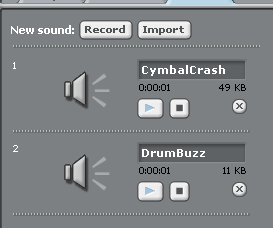
I think my game has strengths for example:  I have variables labeled score and lives. I put the "change the score by 1". After the basket collected an apple, then it would add 1 to the score.  I did the same for "lives" except It's subtracting 1 each time if it hits the smiley face. Furthermore I think my game is eye-catching and colourful.  This entices people to view my blog and want to play my game.  I blogged about my home screen which explains how to play.   Lastly I tried to include sounds for example a cymbal crash would be when you touched the smiley face and the drum buzz was when you collected a piece of fruit.

Testing (showing evidence)


Test 1:  The game must have clear instructions for the user
My game is simple but fun to play .


Test 2: The game must be error-free. I have two errors which I am trying to fix.  The smiley face appears then disappears. Also one apple is slanted. 


Test 3: The game must have the meaningful variables of Score and lives.
I have included variables, score and lives.
 
 Test 4: The game must be documented well in my blog so that I can come back to it at a later date to make alterations to it if needed. I have blogged all pieces of my work which shows what I have learnt and my understanding of the game.
 
 
 Test 5: Each collecting sprite needs to have 3 states:- normal, bulging, slim and named appropriately.  I still need to fix the sizes of the basket so it doesn't changed each second.
 

Test 6: The program has to keep a score of all the collected sprites.
I do keep score of my sprites and it is straight forward.
 
 Test 7: The variable score should go up by 1 and lives should minus 1
My game does include variables.  My score goes up by 1 and my lives go down by 1 each time it hits the smiley face.

 
Test 8: The falling objects should fall into the main object (e.g. basket)
This is in my blog.  If the basket is under the falling fruit, then the fruit will fall into the basket easily.


Test 9: The basket should collect the fruit easily.
My basket can collect the fruit easily
 
Test 10: The scratch game should be found on my blog with clear explanations.   I have blogged all pieces of my work.

Tuesday, 18 November 2014

Game Testing Strategy & Plan

GAME TESTING STRATEGY & PLAN
I will test my game to make sure it works while I create it. I will also test it after I have finished coding to make sure it works fully as planned. I shall do the testing myself but I shall also ask... Stacie
to test certain parts of it. I shall be a test buddy for  Stacie
Here are the tests:-
Test 1:  The game must have clear instructions for the user.
Test 2: The game must be error-free.
Test 3: The game must have the meaningful variables of Score and lives
Test 4: The game must be documented well in my blog so that I can come back to it at a later date to make alterations to it if needed.
Test 5: Each collecting sprite needs to have 3 states:- normal, bulging, slim and named appropriately.
Test 6: The program has to keep a score of all the collected sprites.
Test 7: The variable score should go up by 1 and lives should minus 1
Test 8: The falling objects should fall into the main object (e.g. basket)
Test 9: The basket should collect the fruit easily.
Test 10: The scratch game should be found on my blog with clear explanations.

Tuesday, 4 November 2014

Starting a picnic game with animations


Starting a picnic game with animations

This is a picture of my new picnic that includes a basket, a palm tree, flowers, clouds in the sky and a big bright sun.
As you can see, last lesson I started to include animations and In this case I have moving fruit. I managed to make the fruit change colour and drop.  So now I can move the basket in directions but I need to learn how to let the fruits drop into the basket.  Later on in the lesson, I added a smiley face that appears then disappears so you don't know when it will be back.

Monday, 13 October 2014

Catch the flying fruit (plan)

Catch the flying fruit (plan)


Last lesson we were told to plan out game using these three screens below...

These are my plans for my welcome screen and my main playing screen for my scratch games. 

Welcome screen: My welcome screen includes the catchy name, "Catch the flying fruit".  I drew a basket and  fruits flying like crazy birds!! I also have a sound button which would tell the viewer if the sound is on or off.  I have three options including play, how to play(instructions) and options (e.g. shop)

Main playing screen: My main playing screen is bright and it is set as a picnic screen.  The aim of the game is to catch as many of the flying fruits as you can. Each fruit is classed as one point. In the game, it will have a mega fruit which is the most important fruit to catch with your basket. There will be more information about this fruit in how to play.


Game over screen: Lastly I have the game over screen.  This screen will determine your final score.  Also it includes options like: share(if you want to share your score with your friends or family), play again and shop(buy new fruits or update your game to the next level.


Tuesday, 7 October 2014

scratch picnic description

A brief description
Last lesson I was told to make a game with a theme of a picnic. I drew a bright coloured background with a bold and bright yellow sun and a light blue sky.  I attempted to draw fruit in a basket to go with my picnic setting.  We were told to answer a question saying "Why do we name our sprites and costumes"? We name our sprites and costumes because it make our work more organised and neat rather than trying to figure out which sprite is which!!